
Published by team Sclouta| Last updated 27 November 2026
A website not getting enquiries is one of the most frustrating problems for a Perth business owner. You paid for the site, people may even be visiting it, but the phone stays quiet and the inbox stays empty.
The good news is that traffic but no enquiries is usually fixable, and often the fixes are small. This guide covers ten common reasons a website doesn’t get enquiries, with a quick test for each one you can do in a few minutes, and a practical fix.
Short answer: a website not getting enquiries usually comes down to three things: visitors can’t quickly see what you do, they don’t trust you yet, or it’s hard to get in touch. Fix those first.
Website not getting enquiries? Work out which problem you have first
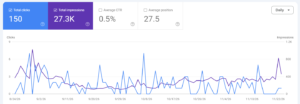
Before changing anything, check your numbers in Google Search Console or Google Analytics:
- Very few visitors: you have a visibility problem. People aren’t finding the site, so work on local search and your Google Business Profile.
- Plenty of visitors, almost no enquiries: you have a conversion problem. People arrive, but something stops them contacting you. Reasons 1 to 7 matter most.
- Some enquiries, but you lose them: reasons 4 and 9 matter most.
If you’re not sure, reason 10 shows you how to find out.
Why is my website getting traffic but no enquiries?
Here are the ten most common reasons.
1. Visitors can’t tell what you do within a few seconds
The problem: many sites open with “We are a leading provider of quality services”. That says nothing a customer cares about. They want to know whether you handle their problem, in their area.
Quick test: ask someone outside your business to look at your homepage for 10 seconds, then tell you what you do and where. If they can’t, your message isn’t clear.
The fix: make the top of every key page say who you help, what you do and where, in plain language. For example: “Electrician in Perth for home rewiring, switchboard upgrades and lighting installs.” Put the main contact option right beside it.
2. There’s no clear next step
The problem: visitors read the page and then don’t know what to do. Pages without a clear call to action lose people who were ready to get in touch.
Quick test: open your three most important pages on your phone. Can you find a way to contact you without scrolling or hunting?
The fix: give every important page one main call to action, such as “WhatsApp us for a quote” or “Request a callback”. Place it near the top and again at the end. Use words that say what happens when someone clicks.
3. Getting in touch is harder than it should be
The problem: extra clicks, hidden phone numbers and long forms are friction. Many customers won’t fill in a form just to ask a simple question.
Quick test: count how many clicks it takes to reach your phone number or form from the homepage. Count how many fields your form has.
The fix: show your phone number and WhatsApp link in the header and footer. Keep the form short (name, contact details, what they need). Under the form, add two or three lines explaining how quickly you reply and that a first conversation is not a commitment. Only promise response times you can meet.
4. Your form or phone number isn’t working
The problem:a website not getting enquiries usually comes down to three things: visitors can’t quickly see what you do, they don’t trust you yet, or it’s hard to get in touch. Fix those first.
Quick test: submit your own contact form from your phone, using a different email address. Check that it arrives, and that it doesn’t land in spam. Tap your phone number on mobile to make sure it actually calls.
The fix: test the form and number every month. Set the form to send to an address you check daily, and keep a second notification (such as WhatsApp or a backup email) so a single failure doesn’t cost you work.
5. There’s no real proof
The problem: claims like “quality workmanship” don’t persuade anyone. People compare you with two or three other businesses and look for evidence.
Quick test: look for genuine reviews, real job photos, short clips or case studies on your key pages. Generic wording and stock photos don’t count.
The fix: add real photos from completed jobs, short video clips, and genuine customer reviews (with permission). Be specific, such as what the customer needed and what you did. Remove any number or claim you can’t verify. You can see examples of our work on our web page
https://sclouta.com/portfolio/
6. Your services and pricing aren’t clear
- The problem: thin service pages and no mention of price leave visitors guessing. If they can’t tell what you offer or how pricing works, they move on to someone clearer.
Quick test: can a customer find out what each service includes, and what affects the price, in under a minute?
The fix: give each main service its own page. Explain what’s included, who it’s for and what affects the cost. Even if you can’t list exact prices, a “how our pricing works” section helps. If you use pricing examples, make them real (with client permission) or clearly label them as illustrations. See our guide on [website costs in Perth]https://sclouta.com/how-much-should-a-small-business-website-cost-in-perth/
7. The site is slow or awkward on a phone
The problem: many local searches happen on mobile. Slow pages, tiny text and hard-to-tap buttons send people back to Google, and a website not getting enquiries is often the result.
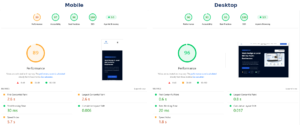
Quick test: load your site on your own phone using mobile data, not wifi. Then run your main pages through Google’s PageSpeed Insights.
The fix: compress large images, remove clutter, use readable text and big tap-friendly buttons, and keep contact options in easy reach on every screen.
8. You’re attracting the wrong visitors, or too few locals
The problem: a site can have decent traffic but from people who aren’t ready to hire, or who aren’t in Perth. Broad, general searches bring readers. Searches that include a service and a location bring buyers.
Quick test: in Search Console, look at the queries bringing visitors. Do they include your service and a Perth location, or only general terms?
The fix: make sure your service pages clearly mention the services you offer and the Perth areas you cover, with real local examples (not copy-and-paste suburb pages). Keep your Google Business Profile complete and make sure your business name, address and phone number match everywhere. Our [Google Maps guide for electricians]https://sclouta.com/electrician-google-map-perth/ shows how to do this.
9. Enquiries come in, but replies are slow
The problem: people contact several businesses at once. The one that answers first often wins the job. If your replies take a day or two, the lead may already be gone.
Quick test: how long did your last three enquiries wait for a reply? Do you get notified straight away?
The fix: switch on instant notifications for new enquiries, and write a short template reply you can send quickly. If you can’t reply during working hours, set an automatic message that says when you’ll be in touch.
10. You don’t know where visitors come from or where they leave
The problem: without tracking, a website not getting enquiries stays a mystery, so you keep guessing and changing things at random..
Quick test: can you say which page or source produced your last three enquiries?
The fix: set up Google Search Console and review impressions, clicks, click-through rate and average position. Ask every new enquiry how they found you and keep a simple log. Check it weekly so small problems get fixed early.
Website not getting enquiries? Here’s where to start
Small, honest improvements add up, even for a website not getting enquiries right now.
- Test your form and phone number (reason 4). It takes five minutes and could be costing you work right now.
- Make the next step obvious (reasons 2 and 3).
- Say clearly what you do and where (reason 1).
- Add real proof (reason 5).
- Clarify services and pricing (reason 6), then check mobile (reason 7).
- Start tracking (reason 10) so you can see what improves.
Small, honest improvements add up, especially if your website is not getting enquiries right now. A clear, trustworthy site that’s easy to contact will beat a bigger site that isn’t.
Frequently asked questions
Why is my website getting traffic but no enquiries?
Usually because visitors aren’t clear what you offer, don’t trust the site yet, or can’t easily get in touch. Check your contact options, proof and message first.
Do I need a new website, or can the current one be fixed?
A website not getting enquiries can often be improved rather than rebuilt. Test the form, the call to action, the proof and the mobile experience first.
How long until changes bring more enquiries?
It depends on how much traffic you have. Fixes to contact options and clarity can show up quickly if you already get visitors. Search visibility changes take longer. Track your results weekly instead of expecting a fixed timeline.
How do I know if my contact form works?
Submit it yourself from your phone using a different email address, then check that it arrives and isn’t in spam. Repeat monthly.
Is it a traffic problem or a website problem?
If hardly anyone visits, it’s a visibility problem. If plenty visit and nobody contacts you, it’s a conversion problem.
Not sure what’s holding your website back?
Every site has a different problem, and sometimes it’s hard to spot on your own. If you’d like help working out why your site isn’t bringing in enquiries, [message Sclouta on WhatsApp]https://wa.me/923714274334 or visit our [small business website service page] https://sclouta.com/services/small-business-website-perth/We’ll talk through what to fix first.